

Why does my digital measuring cup reading keep changing?
Your digital measuring cup reading keeps changing when the load is moving, the cup is not supported steadily, or the scale needs its zero setting restored. Stop pouring, release the handle, place the cup on a firm, level surface, and check the selected unit before treating a changing display as a fault.
- A changing digital measuring cup reading needs a stationary-load check before you replace the tool.
- Keep the cup supported, release the handle, and let liquid settle before reading the display.
- Tare removes container weight; it does not correct an unstable surface or the wrong measurement mode.
- Mystic Leaf Supply Co’s measuring cup combines ingredient weighing and a cup; check instructions for operating limits.
Why does my digital measuring cup reading keep changing?
A digital measuring cup responds to changes in the load its weighing mechanism senses. Pouring, stirring, touching the handle, or setting the cup unevenly can change that load even when you have not deliberately added more ingredients.
The Digital Measuring Cup with LCD Kitchen Scale combines a measuring cup and scale for weighing ingredients as you add them. Troubleshoot a changing reading by separating movement, setup, and display settings before deciding the weighing mechanism has failed.
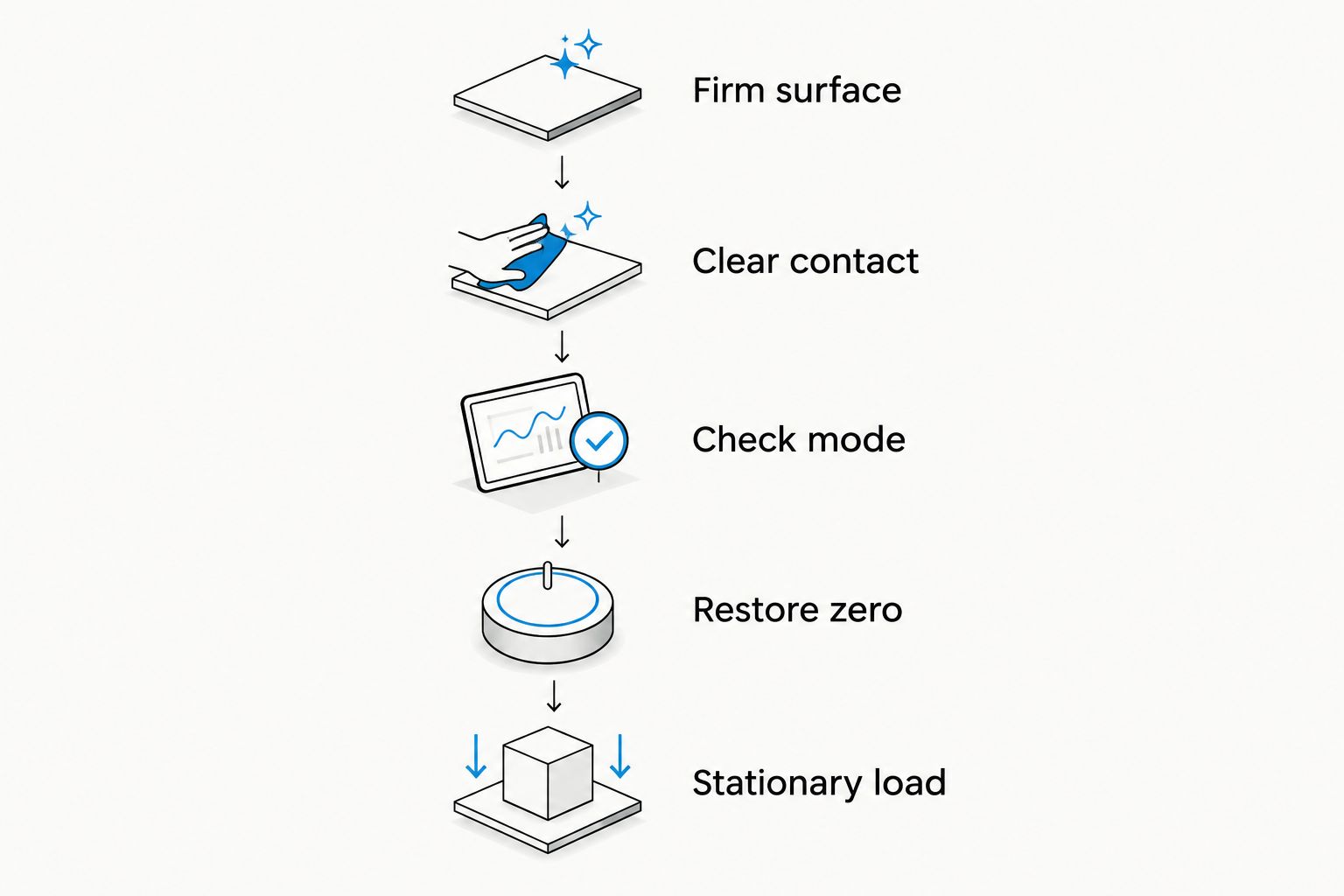
Follow this sequence for a 2026 kitchen check:
- Stop adding ingredients. Remove the spoon or utensil and let the contents settle.
- Set the cup down correctly. Use a firm, level surface and the support position described in the instructions.
- Release the handle. Keep your hands, the ingredient bag, and nearby objects clear of the cup.
- Check the mode. Confirm whether the display shows mass or a volume-related setting.
- Restore zero correctly. Empty the cup and follow the instructions for zeroing or taring.
- Repeat with a stationary load. Add an ingredient, stop handling the cup, and observe whether the display settles.
A reading that settles after you stop touching or pouring needs different troubleshooting from a reading that changes with nothing moving. Do not change the battery, settings, and surface together: you lose the chance to identify which change helped.
Why this matters
A moving display makes it tempting to keep adding ingredients until the number looks right. That creates a second problem: once the display settles, you have added more than intended.
For everyday cooking in 2026, the useful distinction is between a changing load and a changing measurement. A scale should respond while you pour; persistent changes after the cup and contents are still deserve a closer check.
You also need to distinguish repeatability from accuracy. A cup that shows the same result repeatedly is consistent under those conditions, but that alone does not prove that the result matches the ingredient’s actual mass.
Match the display behavior to the next check
Use the symptom you can actually observe. The table below compares troubleshooting routes, not confirmed diagnoses.
| Display behavior | Best for: first check | What the check helps separate | Limitation |
|---|---|---|---|
| Reading changes while pouring | Letting the contents settle | A changing load from an unsettled reading | Does not check accuracy |
| Reading changes when you touch the handle | Releasing all contact | Hand pressure from a hands-off measurement | Correct support still matters |
| Reading differs after moving the cup | Repeating on the same firm surface | Placement changes from ingredient changes | A consistent result is not calibration |
| Display shows an unexpected unit | Checking mode and units | A settings mismatch from a weighing problem | Correct units do not fix instability |
| Reading changes with everything stationary | Checking setup, power, and instructions | Routine operation from a possible device fault | Does not identify the faulty component |
Choose the row that matches your cup before moving to another check. If the display changes only during pouring, start with settling—not replacement.
Why digital measuring cup readings vary
These factors explain different kinds of changes. Check each separately rather than treating every moving number as the same problem.
- Movement: Pouring, stirring, or sloshing changes the forces acting on the cup. Stop the action before reading.
- Support: A soft, uneven, or unstable surface interferes with a controlled weighing setup. Use the support arrangement specified for your model.
- Contact: A hand on the handle or a utensil resting against another object changes the load the scale senses. Clear those contacts.
- Zero setting: Tare changes the baseline used for the next reading. Recheck it after moving or reassembling the cup.
- Measurement mode: Grams and milliliters express different quantities. Switching modes changes what the displayed number represents.
- Power or damage: Follow the manual’s battery checks and error guidance when the display behaves abnormally under steady conditions. Keep moisture away from electronic parts.
A useful 2026 troubleshooting note records the symptom and the change you made: for example, whether releasing the handle stopped the fluctuation. That observation is more useful than simply writing that the cup is inaccurate.
How do I check whether the surface is causing the problem?
Use the same load on the same firm, level surface before comparing results elsewhere. A folded towel, flexible mat, or uneven support introduces another variable into the test.
Start with the cup empty and correctly assembled. Make sure nothing touches its sides or handle, then follow its zeroing instructions and add your test ingredient without moving the cup.
If the reading settles, repeat the setup rather than immediately adding another ingredient. If the display changes only when you relocate the cup, inspect the new support position and re-zero as instructed before drawing a conclusion.
Do not press the cup down to make the display stop moving. Pressure adds another load, so the resulting number does not represent the ingredient alone.
Should I hold the handle while taking a reading?
Release the handle when taking a countertop reading unless your cup’s instructions specify another method. Holding, lifting, or bracing part of the cup changes how its weight reaches the weighing mechanism.
The same issue applies to utensils. A spoon resting partly inside the cup and partly against another container creates a different setup from a spoon sitting entirely inside it.
Keep the ingredient bag clear, too. Letting the bag rest against the rim while pouring means you are no longer measuring only what has landed inside the cup.
For a useful check, finish pouring, move the bag away, remove the utensil, and release the handle. Read the display only after the contents stop moving.
Does tare fix a changing reading?
Tare resets the baseline; it does not repair an unstable weighing setup. Use it to exclude the weight already on the scale before adding the next ingredient, following the model’s instructions.
If you tare while holding the cup or while liquid is still moving, you establish the baseline under those conditions. Releasing the handle or letting the contents settle then changes the load relative to that baseline.
Removing contents after taring can also produce a negative reading. That is not automatically a fault: the display is showing less weight than the baseline you selected.
For your 2026 baking routine, use the same order each time: position the cup, let it settle, tare as instructed, then add the ingredient. Avoid repeatedly pressing tare to hide an unexplained drift.
Can switching between grams and milliliters change the number?
Yes: grams measure mass, while milliliters measure volume. Switching between them is not a test of whether the cup weighs consistently.
For water near room temperature, 1 milliliter has a mass of approximately 1 gram; consequently, 100 milliliters of water has a mass of approximately 100 grams. That familiar relationship does not apply to every ingredient, because ingredients have different densities.
A volume display derived from weight therefore depends on the conversion the device uses. Check which ingredient settings your model actually supports rather than assuming every liquid or powder uses the same relationship.
The guide to digital measuring cups: weight and volume are not the same explains this distinction. Use a mass setting for a recipe written by weight, rather than switching modes until a number looks familiar.
The water example is not a home calibration procedure. Cup markings, pouring technique, temperature, and the measuring tool itself all affect how useful that comparison is.
What should I check if the display still changes untouched?
First, repeat the stationary-load check with the cup correctly supported and no outside contact. Confirm the selected mode, then inspect the instructions for battery warnings, operating limits, and error messages.
If the cup uses a replaceable battery, follow its specified replacement procedure and battery type. Do not assume a particular battery fits or open a sealed electronic section to investigate.
Check for residue or incorrect assembly wherever removable parts attach, but only remove parts the instructions identify as removable. A component that looks detachable is not proof that it is safe to separate or wash.
If liquid has reached the display or another electronic section, stop using the cup and follow the manufacturer’s guidance. Continued testing is not a substitute for assessing possible liquid damage.
Stop relying on the cup for ingredient measurements when it cannot produce a settled reading under its instructed operating conditions. Contact the seller with the model details, selected mode, and a description of the stationary-load test rather than guessing at an internal repair.
When is a measuring cup and scale combination useful?
Mystic Leaf Supply Co’s digital measuring cup is best for shoppers who want a measuring cup and kitchen scale together. The stated benefit is straightforward: you can weigh ingredients as you add them and check an LCD reading.
The limitation is equally important: combining those functions does not remove the need for correct support, the right units, and careful handling. It also does not establish accuracy, waterproofing, supported ingredient conversions, or operating limits beyond the product’s documented details.
Keep your 2026 buying decision tied to the task. If your current cup works once you correct its placement or zero setting, solve that problem before shopping for a replacement.
FAQ
Why does my digital measuring cup keep changing numbers when I stop pouring?
A digital measuring cup needs stationary contents, steady support, and no outside contact before its reading can settle. Release the handle, remove utensils, check the mode, and repeat the test using the instructions for your model.
Should my digital measuring cup show zero when it is empty?
An empty digital measuring cup should show the baseline specified by its operating instructions after correct setup and zeroing. A previous tare setting or a changed support position can explain a different reading.
Can I use my digital measuring cup on a towel?
Use a firm, level support rather than a towel for a controlled weighing check. Soft support introduces another variable and makes it harder to separate placement problems from device problems.
Why does the reading change when I lift the handle?
Lifting the handle changes how the cup is supported and how its load reaches the weighing mechanism. Use the measuring position specified in your cup’s instructions instead of comparing lifted and countertop readings.
Does pressing tare make a digital measuring cup accurate?
Pressing tare resets the measurement baseline; it does not prove accuracy or correct unstable support. Set up the cup correctly before taring, then check whether a stationary load produces a settled reading.
Is a milliliter the same as a gram on a digital measuring cup?
A milliliter measures volume and a gram measures mass, so they are not interchangeable units. Water near room temperature is approximately 1 gram per milliliter, but other ingredients need different density assumptions.
What should I check before replacing a digital measuring cup?
Check support, outside contact, units, zeroing, and the model’s power and error instructions before replacing a digital measuring cup. Mystic Leaf Supply Co shoppers should compare the product’s documented functions with their actual measuring needs rather than assume a replacement fixes handling problems.
One last thing
A steady wrong-unit reading can look more trustworthy than a fluctuating correct-unit reading. Before accepting any number, read the unit beside it—not just the digits.
Make that your final 2026 kitchen check: hands off, contents still, correct unit. If the display continues changing after those checks and the instructed setup, stop compensating by adding ingredients.